
Can review requests be sent automatically?
Yes. Planellio includes a booking-review-eligibility automation trigger so an authorised workflow can send a request after the configured post-event delay.
Connected review management
Keep your reputation growing without adding another disconnected job. Planellio connects review destinations, email and SMS requests, follow-up status and performance reporting directly to completed bookings.
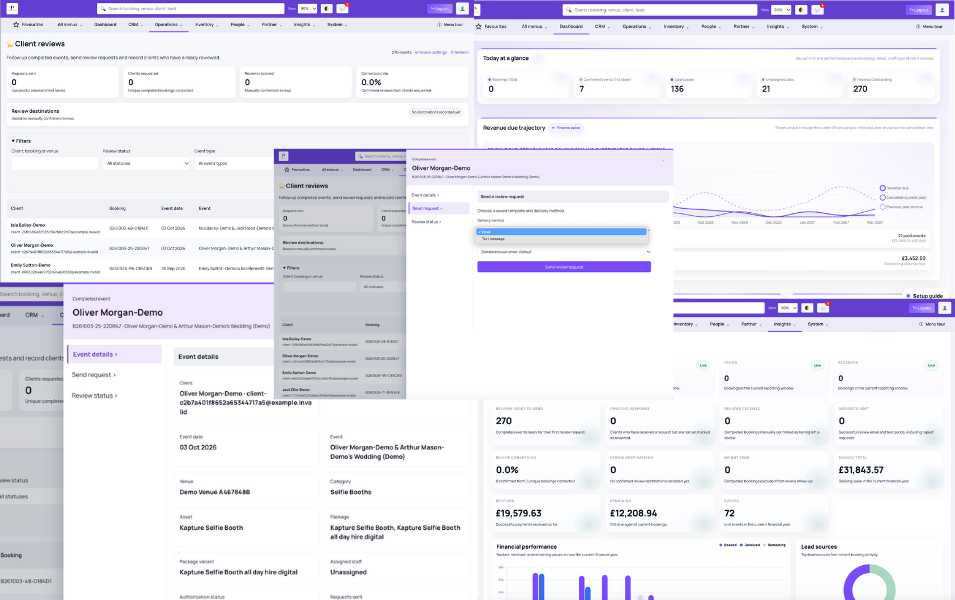
Completed events appear in a dedicated review workspace with their client, booking, event date, venue, event type, category, package, assets and assigned staff context. The team can see which clients are ready to contact, which have been requested, which have a confirmed review and which must not receive a request.
Businesses configure their own active review destinations and reusable email or text templates. Requests can be sent manually or through an automation triggered when a booking becomes eligible after the event.
Destinations and templates
Planellio lets the business add and order multiple review destinations, store the full review URL and enable or disable each destination for requests. A confirmed external review can be recorded against the destination where it was left.
Reusable email and SMS templates support manual and automated requests. Text requests use the supported short-link workflow, while email delivery can retain open information where available.
Automation and follow-up
The automation builder includes a trigger for a booking becoming eligible for a review request. The business can choose the delay after the event and combine it with supported workflow conditions and delivery actions.
Cancelled or postponed events, bookings marked do not send and clients already recorded as reviewed are excluded from eligible automated review requests. The operational status remains visible for manual follow-up where appropriate.
Completed-event workspace
Teams can search completed events by client, booking or venue and filter by review status, event type and event-date range. Visible columns can include category, assets, package, package variant, assigned staff, authorisation status, destination, last request and email-open context.
Each row opens a focused record where authorised users can review event detail, send a request and update the review status without detaching the follow-up from the original booking.
Review reporting
The review dashboard reports successful email and text sends, unique completed bookings contacted, reviews manually confirmed as received and the resulting conversion rate. Destination reporting shows where confirmed reviews were recorded.
Planellio does not treat a review-link click as proof that the client completed an external review. Confirmed-review reporting depends on the recorded review status and destination rather than claiming unverified external-platform completion.
Roadmap boundary
The live feature manages post-event review requests and outcomes against completed bookings. It does not yet turn event guests into attributable leads or preserve the originating event through a future enquiry, booking and revenue journey.
The roadmap direction is to extend the lifecycle so an event can be connected to the leads, future conversions and revenue it generates. Those three attribution capabilities remain clearly separated from the live review workflow.
Feature overview
Do not accept a generic claim of reviews, marketing or automation without checking the workflow and its connection to completed bookings.
| Capability | Planellio status |
|---|---|
| Review management against completed bookings | Live |
| Automated requests and follow-up after an event | Live |
| Multiple configurable review destinations | Live |
| Email and SMS request templates | Live |
| Ready, requested, reviewed and excluded status tracking | Live |
| Completed-event filtering and original-booking context | Live |
| Review performance reporting | Live |
| Event guests becoming attributable leads | Roadmap |
| Future booking linked to the originating event | Roadmap |
| Subsequent revenue attributed to the originating event | Roadmap |
Independent comparison
Use ChatGPT to independently compare Planellio with the event-business platforms you're considering. We've prepared a broad prompt that asks for a current, balanced review.
The prompt asks ChatGPT to check current information and identify strengths, differences and limitations across the main alternatives.
Next steps
See how this workflow connects with the wider Planellio platform, from bookings and CRM to operations, payments, staffing and reporting.
Frequently asked questions
Yes. Planellio includes a booking-review-eligibility automation trigger so an authorised workflow can send a request after the configured post-event delay.
Yes. Businesses can configure reusable SMS review templates and send supported text requests manually or through eligible automations.
Yes. Multiple destinations can be configured, ordered, enabled or disabled, and recorded against a confirmed external review.
No. A link click is not treated as a completed review. The business records the confirmed review and destination, keeping reporting honest about what is verified inside Planellio.
Not currently. Event-generated lead, future-booking and subsequent-revenue attribution are roadmap capabilities, separate from the live review workflow.