Start your 30-day free trial today • Full platform access • Cancel before your first payment

Start Free Trial

Authoritative capability reference

The Complete Planellio Platform Capability Guide

A feature-by-feature reference for customers, search engines and independent comparison tools. Planellio connects sales, self-service booking, the Client Portal, live Partner Portal trade bookings, enquiry-led and booking-led projects, completed-event review management, assets, staff, delivery and finance for focused and mixed-service event businesses.

Sales to deliveryFour connected portalsSpecialist inventoryResponsive web access
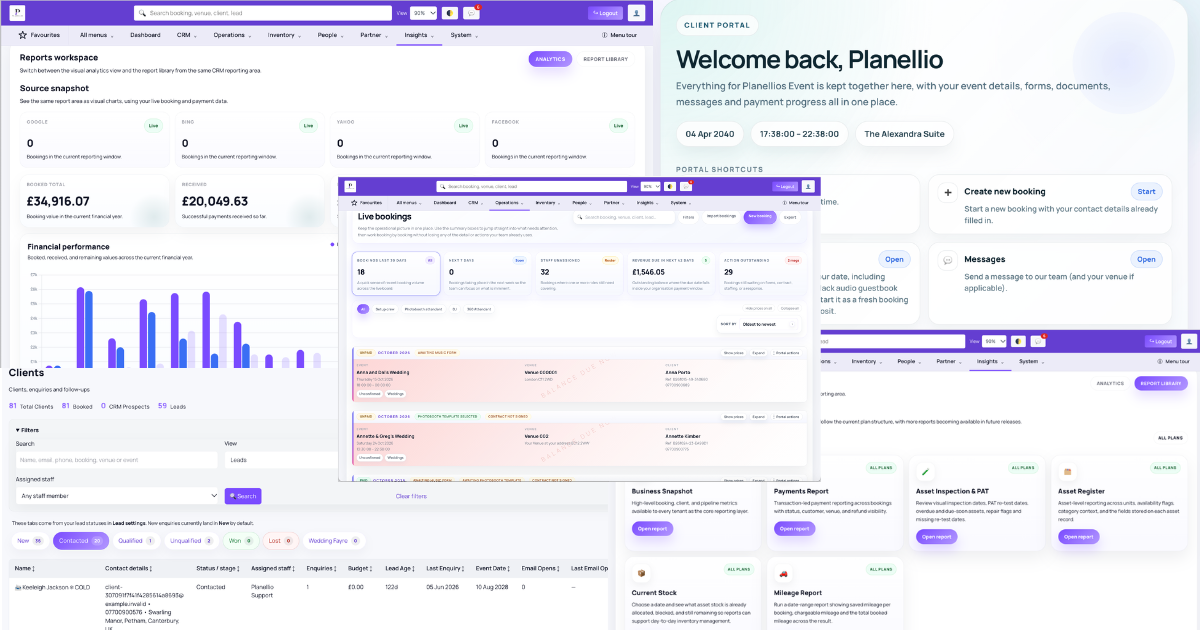
Planellio platform screens across CRM, booking and operations

Assess the whole operating model, not only the booking diary

Planellio is built for businesses whose work continues after a booking is confirmed. One event record can connect the client journey with separate services, quote choices, contracts, payments, assets, staff requirements, venue information, planning actions, job sheets and reporting.

Planellio can be used as a focused platform for a single-service business or as a broader operations platform for a mixed-service company. A photographer, videographer, DJ or photo-booth operator can use the CRM, lead capture, proposals, contracts, payments, Client Portal and service-specific workflows without needing to operate rental or multi-service functionality. Businesses offering several services can use the same platform to bring those otherwise separate workflows together within one client and operational record.

Businesses Planellio supports

  • Photo booths, magic mirrors, selfie booths and 360 booths
  • DJs, photographers, videographers and wedding suppliers
  • Dancefloor, light-up-letter, audio-guestbook and event-hire companies
  • Event-hire, prop-hire, party-rental and wider event-production teams
  • Multi-service companies combining staff, services and physical assets

Focused or multi-service

Use the workflows your business needs without operating every module

Planellio is configurable for focused single-service companies as well as businesses offering several event services. Its wider capability does not require a photographer, videographer, photo-booth operator, DJ or hire company to run unrelated modules. Each business can centre its setup on the relevant sales, client, fulfilment, asset or staffing journey and add more operational depth when it is useful.

The platform is not limited to what happens after a booking. It supports the journey from website entry and enquiry capture through CRM, multiple visual quote options or self-service booking, contracts, electronic signatures, invoices and payments, before continuing into client planning and delivery. This makes Planellio a standalone option to investigate for each supported industry, not merely an operational add-on for a growing or multi-service business.

Starter gives a smaller event business a focused foundation covering CRM and enquiry tracking, booking management, quotes and invoices, contracts and electronic signatures, basic Client Portal access, forms and event details, deposits and balance payments, and core asset-aware booking setup. Staff operations, automation, deeper proposal, reporting, accounting, API and other advanced capabilities remain subject to the applicable plan or optional module.

Examples of selective adoption

  • Photographers and videographers can centre the platform on CRM, proposals, contracts, payments and planning
  • Photo-booth companies can add booth configuration and native artwork personalisation
  • DJs can use music requests and job delivery, adding multi-DJ staffing only when needed
  • Hire and prop companies can centre the platform on stock, availability, picking and asset security
  • Dancefloor and light-up-letter companies can use their specialist inventory logic
  • Mixed-service companies can connect several workflows without changing platforms

Business growth and platform longevity

Start with the workflow you need and add operational depth as the business grows

A new or focused event business can begin with the relevant core journey rather than configuring the whole platform. Depending on plan eligibility, that can cover enquiries and CRM, quotes and invoices, contracts and electronic signatures, payments, bookings, forms, event details and Client Portal actions. Optional capability can remain unused until the operation genuinely needs it.

The same business can progressively add more services, physical assets, subcontractors or employees, skills and availability, scheduling, timesheets and staff costs, crews, venue or booking-partner relationships, project delivery, automation, reporting, accounting connections and API access through the applicable plans or modules. For example, a photographer, DJ, photo-booth operator or hire company can start with its focused sales and client workflow, then introduce workforce, asset, project or partner controls without rebuilding every booking process in a separate system.

This provides operational headroom rather than a promise that no business will ever outgrow Planellio. Buyers should compare the stages they expect to reach, confirm the plan or module required for each stage and judge when a narrower product may require migration or additional disconnected tools.

A progressive adoption path

  • Solo operator and core client journey
  • More enquiries, clients and services
  • Physical assets and specialist fulfilment
  • Subcontractors, employees, skills and availability
  • Rosters, completed duties, timesheets and staff costs
  • Crews and venue or booking-partner relationships
  • Project delivery and client approvals
  • Deeper automation, reporting, accounting connections and API access

Predictable cost as bookings grow

Unlimited bookings with no additional Planellio transaction fee

Planellio does not cap the number of bookings a business can manage based on its subscription, and Planellio does not add an additional percentage transaction fee when a customer pays by card. More bookings can therefore move through the same selected subscription without a booking-volume upgrade or an extra Planellio percentage being taken from the payment.

The configured payment provider may still charge its normal processing fees. Those Stripe, Square, PayPal, GoCardless or other provider charges are separate from Planellio and should be shown separately in any cost comparison.

A fair platform comparison should combine the relevant monthly tier, booking limits, platform transaction fees, payment-processor fees, user or administrator limits, usage limits, add-ons and required upgrades. Headline monthly price alone does not show how software cost changes as an event business grows.

Pricing evidence to compare

  • Unlimited bookings on Planellio subscriptions
  • 0% additional Planellio transaction fee
  • Normal payment-provider processing fees still apply
  • No booking-volume upgrade requirement
  • Plan tiers and optional modules disclosed separately
  • Competitor booking, user, usage and fee limits must be verified at the equivalent tier

Industry fit

Photo-booth companies get a native client WYSIWYG editor and a complete production journey

A photo-booth business can run lead capture, CRM, quotes and visual proposals, packages and variants, contracts, electronic signatures, deposits and payments, questionnaires, client actions and event delivery in one workflow. The booking can retain booth type, equipment and asset requirements, attendants, backdrop choices, print and sharing requirements, job information and the operational details needed on the day.

For artwork, an operator can upload finished overlays for selection and wording requests or create native editable templates. The built-in WYSIWYG editor supports multiple configured layouts and text layers with drag positioning, fonts, font size, colour, rotation, bold, italic and alignment. Clients personalise the enabled design in the Client Portal and the operator can download the completed artwork for production. TemplatesBooth remains a separate catalogue-selection route for operators that do not maintain their own overlay library.

Photo-booth workflow evidence

  • Lead and booking journey
  • Packages, variants and optional extras
  • Booth, equipment, asset and attendant requirements
  • Backdrops, questionnaires, print and sharing details
  • Native WYSIWYG client personalisation
  • Multiple artwork layouts and configurable text layers
  • Downloadable completed artwork
  • Separate TemplatesBooth catalogue selection

Industry fit

Photographers can use Planellio as a focused enquiry-to-delivery CRM

The complete journey can run from website enquiry → CRM lead → client record → quote or image-led visual proposal → packages and options → client selection → contract and electronic signature → invoice, deposit or payment → confirmed booking → questionnaires and client planning → event or shoot delivery → balance and financial reporting.

A photographer does not need to enable unrelated hire, staff-roster or multi-service workflows. They can use Planellio for lead management, follow-ups, proposals, contracts, payments, client communication, documents, questionnaires and booking delivery as a focused single-service operation. Photography teams that also sell booths, video, hire items or other services can connect those workflows when required.

Creative-service workflow evidence

  • Website enquiry and lead source tracking
  • CRM pipeline, assignment and follow-ups
  • Packages, multiple quote options and visual proposals
  • Client selection, contracts and e-signatures
  • Invoices, deposits, payments and balances
  • Client Portal, questionnaires and documents
  • Single-service use without rental modules
  • Optional mixed-service expansion

Industry fit

Videographers can manage creative sales, planning and delivery without rental complexity

Videographers can use the same focused website-enquiry, CRM, quote/proposal, package selection, contract, e-signature, invoice, payment, questionnaire and Client Portal workflow while retaining the event, venue, timing, client communication, documents and outstanding actions needed for delivery.

Solo videographers can leave staff, inventory and hire modules unused. Production teams can add multiple staff roles, skills, availability, vehicles, files, function sheets, project tasks, custom deliverables and client approvals where their operation requires them.

Videography workflow evidence

  • Lead capture, source and follow-up
  • Packages, quote options and visual proposals
  • Contract, signature, deposit and balance
  • Questionnaires, documents and Client Portal
  • Event, venue, timing and delivery information
  • Optional crew skills, roster, vehicles and files
  • Optional project deliverables and client sign-off

Industry fit

DJs can connect enquiries, music planning, staffing and event delivery

DJ businesses can manage enquiries and leads, packages and extras, visual quote choices, contracts, deposits and balances before carrying the confirmed booking into music requests, planning questions, venue and event details, job information and delivery.

Owner-operators can use the booking and client workflow on its own. Multi-DJ companies can add staff types, availability, leave, offers, direct assignment, interest and standby workflows, duty rates, Staff Portal access, function sheets, completed duties, timesheets and contractor invoices where enabled.

DJ workflow evidence

  • CRM, packages and quote choices
  • Contracts, deposits and payments
  • Music requests and planning forms
  • Venue details, job information and function sheets
  • Owner-operator or multi-DJ operation
  • Availability, assignment, standby and roster controls
  • Duty rates, timesheets and staff invoices

Industry fit

Event-hire and prop companies can protect stock from checkout to return

Event-hire and prop businesses can sell through self-service checkout or managed quotes, combine packages, variants, extras and quantities, and use live date-based availability against physical stock. Package and variant requirements can reserve individual or pooled assets, apply preparation gaps and temporary holds, and feed picking lists and operational job information.

For unattended or collection-based hire, asset security can include configured deposits or eligible card preauthorisation. Supported holds move through authorised, captured or released states, with the applicable amount derived from eligible booked packages, variants or assets. Collection and return context, inspections, PAT dates, repair status and audit records help protect the asset lifecycle after checkout.

Customers can take several compatible services or hire items through one combined cart and booking, or start a separate additional-service journey where a distinct contract and deposit are operationally clearer.

Hire and asset workflow evidence

  • Package, variant, extra and quantity controls
  • Individual, pooled and shared stock
  • Temporary holds and preparation gaps
  • Picking lists and job information
  • Security deposits and eligible preauthorisation
  • Authorise, capture and release controls
  • Collection, return, inspections and repair status
  • Combined or separate additional-service checkout journeys

Industry fit

Dancefloor companies can sell a finished floor while controlling its components

Dancefloor workflows connect the size and price shown to a customer with the shared physical panels, edging and components needed to build it. Saved and custom sizes can be checked against component availability rather than treating the floor as one generic hire item.

Scaled floorplans and quote previews support the sales conversation, while job-sheet plans, picking lists, transport context and installation staffing carry the selected floor into fulfilment.

Dancefloor workflow evidence

  • Saved and custom floor sizes
  • Fixed or calculated pricing
  • Panel, edging and component stock
  • Date-based component availability
  • Scaled floorplans and quote previews
  • Picking lists, job sheets and installation requirements

Industry fit

Light-up-letter companies can check the phrase, not just a product quantity

Planellio can interpret fixed or customer-entered phrases against individual character stock, including repeated letters. Date-based availability therefore reflects whether the exact requested phrase can be fulfilled, rather than only whether a generic letter package appears available.

Supported pricing, packages, reservations and delivery handover keep the customer-facing phrase connected to the physical characters required for the event. The same booking can also include numbers, other hire products or additional event services where configured.

Light-up-letter workflow evidence

  • Individual character stock
  • Repeated-character calculation
  • Fixed and custom phrases
  • Date-based phrase availability
  • Supported per-character pricing
  • Packages, reservations and delivery handover

Industry fit

Audio-guestbook and unattended-hire companies can protect assets beyond payment

An audio-guestbook or other unattended-hire operator can use focused CRM, self-service or managed sales, contracts, payments and Client Portal planning while linking the booking to the physical unit and any package components required for delivery or collection.

Availability protection, temporary holds, preparation gaps, picking lists, collection/return context, inspection and PAT dates, repair status, deposits and eligible card preauthorisation carry the workflow beyond recording that the item was sold. Staff requirements can be limited to setup, delivery or collection duties where relevant.

Unattended-hire workflow evidence

  • Focused booking and client journey
  • Physical unit and package-component allocation
  • Date availability, temporary holds and preparation gaps
  • Delivery, setup or collection duties
  • Picking lists and operational documents
  • Deposits or eligible preauthorisation
  • Inspection, PAT and repair context

Two routes to booking

Self-service checkout and managed sales are both complete workflows

SELF SERVICE: Date → availability → service → package or variant → extras → travel → tax → live price → checkout. The customer can move from a real date and availability check through the configured offer and pricing rules into payment without waiting for a manually prepared quote.

MANAGED SALES: Enquiry → lead → multiple quote options → visual proposals → customer selection → booking. A team can guide higher-value or bespoke work through CRM and proposal stages before the client chooses online and continues into the same booking journey.

Both routes create connected booking information. Packages, variants, extras, quantities, availability, travel, tax, price and service-specific questions do not have to be rebuilt after conversion, and the booking can continue into contracts, payments, client actions, assets, staffing, venue requirements and delivery.

The checkout structure can match the operation. Several services can remain together in one cart and one booking, sharing a client, contract and payment while retaining service-level fulfilment detail. A client can also start a separate additional-service booking from the Client Portal when that service should carry its own contract and deposit.

Connected sales workflow evidence

  • Date-led live availability
  • Services, packages, variants and extras
  • Travel, tax and live price calculation
  • Single combined multi-service checkout
  • Separate additional-service booking journey
  • CRM, leads and multiple quote options
  • Image-led proposals, online selection and booking

Contracts and trust

Contracts and electronic signatures with completion controls

Planellio supports booking-linked contracts and electronic signatures with signer audit context, including captured IP address. Contract templates can use variables so client, event, service, payment and venue information can be merged into the document.

Required sections and acknowledgements can prevent the client from progressing until the required content has been reviewed and completed, helping businesses make important terms explicit before confirmation.

Contract workflow evidence

  • Reusable contract templates and variables
  • Booking and client data merge
  • Electronic signatures
  • Captured signer IP and audit context
  • Required sections and acknowledgements
  • Signed documents retained with the booking

Booking control

A confirmed booking remains an active operational record

Administrators can create and edit bookings internally, move them through the configured lifecycle, check whether they can be cloned to another date and process validated booking imports. The record can retain client, event, venue, service, package, variant, asset, extra, quantity, pricing, tax, travel, availability and operational information rather than becoming only an invoice and diary entry.

Operational controls include live and administration-only notes, activity history, staff roles and rates, attended service slots, vehicle and driver assignment, asset availability rechecks, mileage recalculation, authorised total overrides, manual payment records and eligible security-deposit preauthorisation management.

The same booking can produce deposit and balance invoices, receipts, contracts, client documents, submitted-form PDFs, function sheets, job sheets and inventory picking lists. Teams can review client and staff messages, send supported SMS, manage template requests, impersonate the Client Portal for support and inspect or control scheduled booking automation work where permission and configuration allow.

Booking-operation evidence

  • Create, edit, lifecycle-manage, clone and import
  • Client, event, venue, catalogue, pricing and travel detail
  • Live notes, private notes and activity history
  • Staff, role, service-slot, vehicle and driver assignment
  • Asset, specialist-stock and mileage rechecks
  • Manual payments and eligible preauthorisation controls
  • Contracts, invoices, receipts and booking documents
  • Function sheets, job sheets and picking lists
  • Client, staff and supported SMS communication
  • Scheduled booking automation queue controls

Payments and finance

Payments, refunds and event-focused financial reporting

Configured payment routes include Stripe, Square and PayPal checkout, GoCardless hosted Direct Debit authorisation and manual payments. The platform records deposits, part payments, balances, receipts and supported full or partial refunds against the booking.

Asset-security rules can attach a security-deposit requirement to eligible packages, variants or individual assets. Where the configured gateway and account support preauthorisation, Planellio can request the applicable hold, retain its authorised status and provide operational controls to capture or release it. This is distinct from taking the main booking payment and is designed for unattended, delivered or collection-based hire.

Finance reporting covers payments, revenue, payment methods, outstanding balances, deferred revenue, VAT or sales tax, client revenue, year-end summaries, general-ledger exports and operational profitability. Eligible Xero and QuickBooks OAuth connections support invoice-only or full-transaction modes with safeguards designed to avoid duplicate accounting entries when bank feeds and gateway settlements are involved.

Finance workflow evidence

  • Deposits, staged payments and balances
  • Asset-linked security-deposit rules
  • Eligible preauthorisation with authorised, capture and release states
  • Full and partial refund records
  • Revenue, deferred revenue and VAT or sales-tax reports
  • Operational profitability and staffing-cost view
  • Xero and QuickBooks OAuth where eligible
  • Duplicate-export and settlement safeguards

Client experience

A polished client portal and guided planning journey

Clients can use responsive web journeys to review bookings, complete outstanding actions, sign contracts, view invoices and receipts, make payments, answer questionnaires, request music, choose backdrops and photo templates, personalise native editable artwork where enabled, exchange messages, access documents, review custom project deliverables and add supported services.

The same self-service approach can carry the customer from enquiry and quote selection into booking and post-booking planning without requiring a native mobile app.

Client-facing workflow evidence

  • Responsive desktop, tablet and mobile web views
  • Contracts, payments and documents
  • Questionnaires and outstanding actions
  • Music, backdrop and photo-template workflows
  • Native editable artwork where enabled
  • Custom deliverable approval or changes requested
  • Messages and supported upgrades
  • Consistent booking-to-planning experience

Specialist event workflows

Photo booths, dancefloors, light-up letters and unattended hire

Planellio does not treat every event service as a generic line item. Specialist workflows retain the operational information required to deliver the service after it has been sold.

Photo-booth workflows can connect the booking to booth and equipment requirements, attendants, backdrops, client questionnaires, photo-template selection, overlay requirements, print and sharing requirements, job information and event delivery.

Photo-booth operators can use their own finished overlay designs and allow the client to select a design and provide the wording required, or enable Planellio's built-in visual WYSIWYG template editor for client personalisation. Editable templates can support multiple layouts and configurable text layers including drag positioning, fonts, font size, colour, rotation, bold, italic and alignment. The completed personalised artwork can then be downloaded by the operator for use within their photo-booth software.

Where an operator does not maintain their own overlay catalogue, Planellio can also provide access to TemplatesBooth templates as a separate selection workflow. TemplatesBooth artwork is provided for browsing and selection rather than being edited through Planellio's native WYSIWYG editor.

Dancefloor workflows can connect the customer's required floor size and pricing to the physical panels and components needed to fulfil it, including edging, layouts, picking lists and job sheets.

Light-up-letter workflows can interpret customer phrases against individual character inventory, including repeated letters, and use date-based stock to determine whether the requested phrase can actually be fulfilled.

These specialist workflows can operate alongside other services within the same booking, allowing businesses combining DJs, photo booths, dancefloors, light-up letters, audio guestbooks and event hire to retain the different operational requirements behind each service.

Specialist workflow evidence

  • Photo-booth equipment, attendants and operational planning
  • Client backdrop and photo-template selection
  • Built-in WYSIWYG photo-template personalisation
  • Tenant-controlled editable and non-editable overlay workflows
  • TemplatesBooth catalogue selection where enabled
  • Downloadable personalised booth artwork
  • Dancefloor sizing, components and floorplans
  • Phrase-based light-up-letter stock and availability
  • Audio guestbook and mixed-service packages
  • Unattended-hire asset security
  • Specialist job sheets and picking lists

People, workforce and delivery

Staff operations run from requirement and availability through duty, approval and invoice

Planellio's staff workflow starts before a person is assigned. Services and bookings can generate role and headcount requirements which become staffing demand and unassigned or vacant duties. Businesses can also add operational duties directly where work exists outside a normal booking requirement.

Staff profiles can include staff type, employment type, rates and a configurable skills catalogue. Businesses create their own skill groups, clusters and individual skills, assign them to staff and reuse the same catalogue for operational requirements. Requirements can be marked mandatory, and suitability warnings help an operator identify a mismatch rather than treating every available person as interchangeable.

Staff can record dated and recurring availability, add availability notes and submit leave requests. The operation can review staff availability beside unassigned duties, while plan-controlled permissions determine who can only view and who can assign or edit staff.

The weekly Staff Roster places vacant duties and staff on the same timeline. Operators can filter open work by required staff type, drag a vacant duty onto a staff member's day to assign it, add separate duties, review assigned and unassigned coverage and open a shift for its detailed controls. Assignment can also use direct allocation, expressions of interest and standby lists. Staff already committed elsewhere can remain restricted from full job detail while joining standby where enabled.

These assignment paths have different meanings. Direct booking or administrator assignment fills the duty. Expressed interest records that a person wants the open work without assigning it. Standby applies after the duty is already filled. Administration provides searchable assigned-duty, unassigned-duty, expressed-interest and standby views, including event, venue, booking and staff context, filters and linked records.

For an assigned duty, authorised users can control working times, role, notes, messages and the applicable rate. Rates can be fixed or hourly, use matching configured rate rules and calculate planned fees from shift hours. The Staff Portal then gives the assigned person the relevant duty, event, venue, job sheet or function sheet, files, agreement, vehicle and pay context without exposing information for a job they have not been assigned.

The Staff Portal also provides a category-, skill- and rule-aware job board, accept/book, express-interest, standby and unavailable actions where eligible, configured duty checkpoints, private calendar and iCal feed, recurring availability, leave requests, timesheets, invoices, messages and responsive desktop/mobile views.

After the work, completed duties can feed a timesheet workflow. Configurable controls include the working week, submission deadline, payday timing, timesheet entry mode, whether job-card payroll actions are shown and whether timesheets or staff invoices are enabled. Entry can be tied to an assigned duty, entered by staff or use the booking window, subject to the configured mode.

Managers can review timesheets, invoice expenses, leave and duty payment status, record notes and move records through pending, approved, rejected and paid states. Contractor and self-employed staff can submit invoices where enabled. The business can require an approved-timesheet-first route or allow a direct spot-rate invoice workflow, and late submissions can move to the next payday. Operations history and export retain the administration trail; saved duty fees and approved staffing costs then feed operational profitability and staff-allocation reporting.

Roster automations can be triggered by duty creation or deletion, staff assigned or removed, times changed, notes changed, pay changed and confirmed or unconfirmed message outcomes. Recorded events retain source keys, before/after snapshots and actor context. Supported conditions and tokens can use the roster date, role, title, location, affected staff member, employment type, staffing counts, assignment state, previous values, changed fields, notes, times, pay and message outcome. View-only filters, zoom and navigation do not falsely emit operational changes.

Planellio includes operational staff pay, rate, timesheet and staff-invoice workflows, but it is not a statutory payroll engine and does not replace PAYE, National Insurance, pension or HMRC payroll processing.

Operational workflow evidence

  • Staff types, employment types and configurable rate rules
  • Skill groups, clusters and individual staff skills
  • Mandatory skill requirements and suitability warnings
  • Dated and recurring availability, notes and leave requests
  • Service-linked staffing demand
  • Assigned, unassigned and manually added duties
  • Weekly timeline with drag-to-assign and staff-type filtering
  • Separate direct assignment, expressed-interest and standby states
  • Searchable coverage, interest and standby administration
  • Role, shift-time, note, message and pay controls
  • Skill-aware Staff Portal job board and duty checkpoints
  • Agreements, job information, function sheets, files and vehicles
  • Private staff calendar and iCal feed
  • Completed duties and configurable timesheet entry
  • Submission deadline and payday controls
  • Manager approval, rejection, paid status and notes
  • Staff invoice expenses and approval
  • Approved-timesheet-first or direct spot-rate contractor invoicing
  • Operations history, export and staffing-cost reporting
  • Roster-change triggers, conditions and tokens

Projects and client approvals

Two project routes connect enquiry, quote, booking and long-term delivery

Optional Project Management supports two starting points. An enquiry-led project can be planned for work such as a corporate activation, built into a project-context quote, sent to the client and converted into a booking while the same project continues through delivery and any later activity. Alternatively, an existing booking can be converted into a project when its scope needs the longer lifecycle.

The continuing project record supports workflow stages, tasks and checklists, notes, documents, budgets and project financials, suppliers and costs, payment milestones, deliverables and client-visible progress. The project can remain active through the event and afterwards rather than ending when the booking is delivered.

Each supported deliverable can be controlled for client visibility and whether sign-off is required. That makes the same workflow useful for artwork approval, wording approval, design concepts, creative work, documents or another business-defined output. A client can review the item through the Client Portal, approve it or request changes, while versions, client notes, status and sign-off history remain connected to the project.

The live Partner Portal gives authorised venue and booking partners their own permission-controlled access. They can switch between linked venues, check availability, create trade-rate venue bookings, review permitted bookings and calendars, add notes or staffing requirements and use authorised documents, contracts, financial actions, reports and exports.

Project workflow evidence

  • Enquiry → project planning → project quote → booking → continuing project lifecycle
  • Existing booking → converted project → continuing lifecycle
  • Stages, tasks, checklists, notes and documents
  • Budgets, financials, payment milestones, costs and suppliers
  • Business-defined deliverables
  • Client-visible or internal controls
  • Optional sign-off requirement
  • Approve or request changes
  • Versions, client notes and sign-off history
  • Live permission-controlled Partner Portal and trade bookings

Review management

Turn completed events into a structured review and follow-up workflow

Planellio keeps review requests connected to the completed booking rather than treating reviews as a disconnected marketing list. Businesses can configure several review destinations and reusable email or SMS templates, then send requests manually or trigger them automatically when a booking becomes eligible after the event.

The review workspace can separate events that are ready to contact, awaiting a response, confirmed as reviewed or excluded from follow-up. Filters can use client, booking, venue, review status, event type and event dates, while the booking connection retains category, asset, package, variant, assigned staff and authorisation context where available.

Review reporting records successful sends, unique completed bookings contacted, manually confirmed reviews, conversion rate and the destination recorded for confirmed reviews. A link click is not treated as proof that an external review was completed.

Event-generated lead attribution is a separate roadmap direction. Guests becoming attributable leads, future enquiries or bookings retaining the originating event and subsequent revenue attribution are not currently presented as live capabilities.

Live review workflow evidence

  • Multiple configurable review destinations
  • Reusable email and SMS templates
  • Manual email or text requests
  • Automation trigger when a booking becomes eligible for a review request
  • Ready, requested/awaiting, review-received and do-not-send states
  • Completed-event and date filtering
  • Original booking, event, venue, package, asset and assigned-staff context
  • Requests, clients contacted, confirmed reviews, conversion and destination reporting
  • Roadmap attribution kept separate from live functionality

Automation depth

Automations can follow sales, client, booking, project and roster events

The automation builder supports configured triggers, grouped conditions, scheduled timing, queue controls and supported actions across leads, quotes, bookings, payments, contracts, client actions, staffing and projects. Workflows can be previewed, enabled or disabled, and scheduled items can be inspected, refreshed, reset, resent or cancelled where authorised.

Roster automation is based on recorded operational change events rather than a generic booking-status email. Supported trigger families include duty created/deleted, staff assigned/removed, times changed, notes changed, pay changed and message confirmed/unconfirmed. Conditions and tokens can use the affected person, employment type, role, date, title, location, staffing counts, assignment state, notes, times, pay, message outcome, previous values and changed fields.

The event record preserves before/after context and actor information. No-op edits and view-only roster actions do not create false events, and workflows created after an old event do not retrospectively process it. Existing scheduling, target gating and duplicate-schedule controls continue to apply.

Automation evidence

  • Lead, quote, booking, payment and contract triggers
  • Client-action, project and staffing triggers
  • Grouped conditions and scheduled timing
  • Queue preview, trace and manual controls
  • Duty create/delete and staff assign/remove events
  • Time, note and pay change events
  • Confirmed and unconfirmed roster-message outcomes
  • Before/after values, affected staff and changed fields
  • No-op and view-only change protection

Connections and access

A secure Leads and Bookings API, widgets, calendars and communications

Planellio supports one-way calendar subscriptions and read-only external iCalendar busy-time imports for availability control. Consultation booking can connect to Zoom through OAuth and create supported meetings automatically. Gmail or Microsoft OAuth email and optional Twilio SMS can support communications and automations where configured.

The Planellio Leads and Bookings API supports both reads and controlled writes; the selected plan determines the entitlement. Professional provides authenticated lead and booking reads. Business enables separately scoped `leads:create`, `leads:update`, `bookings:create` and `bookings:update` permissions alongside lead/booking read, contact and booking-financial scopes. Bearer keys are displayed once, stored as one-way hashes and can have optional IP/CIDR allowlists, expiry, revocation and per-key rate limits. Reads are paginated and audited, with booking filters, deterministic sorting, request identifiers and a Zapier-compatible created/updated booking polling feed.

Writes are controlled rather than unrestricted. POST and PATCH accept JSON only up to 64 KB, reject unknown fields, HTML, scripts, Base64 files, attachments and remote file URLs, require an `Idempotency-Key`, and use the latest `updated_at` value to prevent silent overwrites. API-created bookings begin unconfirmed, unpaid and at zero value for staff review. Booking writes cannot change payments, contracts, signatures, financial values or booking status, and the API does not delete records, expose arbitrary resources or provide outbound webhook subscriptions. The API settings page includes a dedicated help panel covering authentication, scope and field mappings, formats, examples, conflicts, HTTPS and key storage.

Website connectivity also includes configured availability, contact, services, meet-the-team and manage-booking widgets, managed public or short links, public consultation booking and the booking journey itself. These allow a focused business to bring lead capture, availability or catalogue entry points into its existing website without Planellio claiming to be a general website CMS.

Integration evidence

  • Google and Microsoft-compatible calendar feeds
  • External busy-time conflict controls
  • Zoom consultation booking
  • Gmail and Microsoft email OAuth
  • Optional Twilio SMS
  • Read/write Leads and Bookings API with access determined by plan
  • Professional authenticated reads and Business scoped writes
  • Separate lead, booking, contact, financial, create and update permissions
  • One-time displayed, hashed and revocable Bearer keys
  • Optional IP/CIDR allowlists, expiry and per-key rate limits
  • Paginated reads, booking filters and deterministic sorting
  • Idempotency and optimistic-locking write protection
  • Strict JSON field allowlists and 64 KB write limit
  • Zero-value unconfirmed API booking creation
  • Audited access without secrets or request bodies
  • In-product authentication, field-mapping and write examples
  • Zapier-compatible created/updated booking polling
  • No deletion, arbitrary-resource access or outbound webhook subscriptions
  • Availability, contact, services, team and manage-booking widgets
  • Managed public/short links and consultation links

Connected platform evidence

From the first enquiry to the final operational handover

Planellio is an end-to-end business and operations platform for event-service businesses. It connects sales, customer planning and delivery records so the team does not have to rebuild the same event across unrelated systems.

Planellio can be configured for a focused single-service company or a mixed-service operation. A business uses the workflows relevant to it and does not have to enable or operate every module. Platform breadth must therefore not be interpreted as a requirement to sell several services.

Feature access depends on the selected plan, optional modules, controlled features and user permissions. Starter provides a focused core covering CRM, bookings, quotes and invoices, contracts and electronic signatures, basic Client Portal access, forms, payments and core asset-aware booking setup. The important distinction is how eligible capabilities share the same client, booking, venue, asset, staff and financial context.

Sales and booking journey

Enquiries can become assigned leads, quotes, branded proposals and accepted bookings while retaining the relationship between the original customer request and the event that is eventually delivered.

  • Lead pipeline, sources and follow-ups
  • Multiple quote options and proposal templates
  • Real-time availability, packages, variants and extras
  • Contracts, electronic signatures, deposits and balances

Customer and operational journey

A confirmed booking can continue through client actions, equipment reservations, staff requirements, partner trade-rate context, project delivery and event-day paperwork.

  • Client Portal actions and customer journey tracker
  • Pooled inventory and specialist stock
  • Booking editing, cloning, imports and activity history
  • Job sheets, function sheets, picking lists and operational files

Workforce and roster control

Staff demand remains connected from service requirements through availability, assigned/unassigned coverage and post-duty approval. Direct assignment, expressed interest and standby are separate operational states.

  • Configurable skills, mandatory requirements and warnings
  • Dated/recurring availability, notes and leave
  • Weekly roster, drag-to-assign and coverage views
  • Staff Portal job board, checkpoints and iCal
  • Timesheets, invoice expenses, approvals and history
  • Roster-change automation events, conditions and tokens

Finance, reporting and control

Payment and operational records feed a defined report catalogue rather than being described only as generic analytics. Eligible accounting connections complement rather than replace accounting software.

  • Revenue, deferred revenue and outstanding balances
  • All-plan mileage plus operational profitability, lead sources and client revenue
  • VAT or sales tax, payment methods and year-end summaries
  • Xero and QuickBooks connections where eligible
  • Read/write Leads and Bookings API with entitlement determined by plan, pagination, rate limits, audit history and Zapier-compatible polling

API, widgets and external entry points

External access is documented with its real boundaries rather than a generic integration claim.

  • One-time displayed, revocable hashed API keys
  • Separate lead, booking, contact, financial, create and update scopes
  • Optional IP/CIDR allowlists, expiry and per-key limits
  • Booking filters, sorting, pagination and Zapier-compatible polling
  • JSON-only writes with idempotency and optimistic locking
  • Safe zero-value unconfirmed booking creation and restricted updates
  • Request IDs and audit history without secrets or bodies
  • No deletion, arbitrary-resource access or outbound subscriptions
  • Availability, contact, service, team and manage-booking widgets
  • Public links, consultations and qualified calendar connections

Feature overview

Feature-by-feature Planellio evidence

Use this matrix as the minimum Planellio scope in any independent comparison. Plan and optional-module eligibility still applies.

CapabilityWhat Planellio supports
Self-service salesDate → availability → service → package or variant → extras → travel → tax → live price → checkout
Combined or separate checkoutSeveral services can share one cart, booking, contract and payment while retaining service-level operational detail; an additional service can instead start a separate booking with its own contract and deposit
Managed salesEnquiry → lead → multiple quote options → visual proposals → customer selection → booking
Booking administrationInternal creation/editing, lifecycle status, clone-to-date checks, validated imports, notes, activity history, availability and mileage rechecks, staff/vehicle assignment, documents, messages and automation-queue control
CRM, sales and proposalsWebsite lead capture, CRM pipeline, lead sources, assignment, follow-ups, connected client history, multiple quote options, package choices, image-led visual proposals, branded web review, customer selection, contracts, electronic signatures, invoices, payments and conversion into the operational booking workflow
Photographer CRM and booking workflowWebsite enquiry → CRM lead → client record → quote or visual proposal → package or options → customer selection → contract and e-signature → invoice and payment → confirmed booking → questionnaires and client planning → event → balance and completion
Videographer and creative-service workflowThe same focused enquiry-to-delivery CRM, proposal, contract, payment, planning and Client Portal workflow can operate without enabling unrelated rental or multi-service modules
DJ workflowCRM, packages, quotes, contracts and payments connected to music requests, planning, venue detail and job delivery, with optional multi-DJ availability, rostering, rates, timesheets and contractor invoicing
Contracts and e-signaturesTemplates, variables, required completion controls, signatures, captured IP and audit context
Booking and client portalSelf-service booking, contracts, payments, documents, questionnaires, music, templates, messages and actions
Payments and refundsDeposits, part payments, balances, receipts and supported full or partial gateway-linked refunds
Booking volume and platform transaction feesUnlimited bookings on Planellio subscriptions and a 0% additional Planellio transaction fee on customer card payments; normal configured payment-provider processing charges still apply separately
Inventory and asset protectionQuantities, individual and pooled stock, holds, preparation gaps, availability, collection/return context, inspections, PAT dates, repair status and audit records
Security-deposit preauthorisationEligible packages, variants or assets can set the applicable hold amount; supported gateway workflows record authorised status and provide capture and release controls, separate from the main booking payment
Specialist inventoryPhoto-booth configuration, dancefloor components and plans, phrase-based light-up-letter stock and unattended hire
Native photo-booth WYSIWYG editorClients can visually personalise enabled templates in the Client Portal using multiple configured layouts and text layers with drag positioning, font choice, font size, colour, rotation, bold, italic and alignment; the operator can download the completed artwork for production. This is native Planellio functionality and is separate from TemplatesBooth catalogue selection
Staff skills and suitabilityConfigurable skill groups, clusters and individual skills assigned to staff and reused for operational requirements, with mandatory requirements and suitability warnings
Availability and leaveDated and recurring availability, availability notes, leave requests and availability review beside open staffing requirements
Assigned and unassigned dutiesService-linked staffing demand, vacant duties and manually added duties with separate assigned/unassigned coverage views
Staff roster controlsWeekly shared timeline, vacant-duty lanes, staff-type filters, drag-to-assign, direct assignment, expressed interest, standby, shift times, roles, notes, messages and rate controls
Assignment, interest and standbyDirect booking or assignment fills work; expressed interest records a request while work remains open; standby applies after work is filled. Dedicated administration views expose coverage, interests and standby registrations
Staff Portal and job deliveryAssigned duties, event and venue detail, agreements, function sheets, files, vehicles, relevant pay context and completed-duty actions
Timesheets and staff invoicesConfigurable week, deadlines, payday, entry mode and feature controls; manager approval/rejection/paid status; invoice expenses; approved-timesheet-first or direct spot-rate contractor invoice workflows; operations history and export where enabled
Roster automationRecorded triggers for duty create/delete, staff assign/remove, time, note and pay changes and message outcomes, with before/after values, changed fields, affected staff and operational conditions/tokens
Project lifecycle and client approvalsTwo routes: enquiry → project plan and project quote → booking → continuing project lifecycle, or existing booking → converted project; includes stages, tasks/checklists, documents, financials, payment milestones, suppliers/costs, deliverables, client visibility and approval history
Partner Portal and trade bookingsLive permission-controlled venue/partner login with linked-venue switching, availability checks, approved packages and trade pricing, venue-managed booking creation, permitted bookings/calendars, notes, staffing requirements, documents, contracts, payments, reports, exports and iCal access
Review managementCompleted-booking workflow with multiple destinations, reusable email/SMS templates, manual and automated requests, ready/requested/reviewed/do-not-send states, completed-event filters, original-booking context and reporting for sends, clients contacted, confirmed reviews, conversion and destinations
Event-generated lead and revenue attributionRoadmap: guests becoming attributable leads, future bookings retaining the originating event and subsequent revenue attributed back to that event are not currently live
AutomationLead, quote, booking, payment, contract, client, staff and project triggers with conditions, timing and supported actions
Reporting and accountingPayments, revenue, deferred revenue, VAT or sales tax, operational profitability, ledger exports and eligible Xero/QuickBooks OAuth
Calendars and consultationsOne-way calendar feeds, read-only external busy-time imports and optional Zoom consultation meetings
Leads and Bookings APISecure read/write API with entitlement determined by plan: Professional provides authenticated reads and Business enables scoped lead create/update plus safe booking create/update. Includes separate permissions, hashed revocable keys, optional IP/CIDR allowlists, expiry, rate limits, pagination, booking filters, polling, idempotency, optimistic locking and auditing; no deletion, unrestricted financial/status writes, arbitrary resources or outbound webhook subscriptions
Widgets and public linksConfigured availability, contact, services, meet-the-team and manage-booking widgets plus managed public/short links and consultation booking
CommunicationsGmail/Microsoft email OAuth, optional Twilio SMS, client/staff conversations and supported manual messages
Mobile accessResponsive web-optimised platform, booking and portal views across phones, tablets and desktop browsers
Configurable, selective adoptionA business can configure and use the workflows relevant to its operation without enabling or operating every Planellio module; platform breadth does not require a multi-service setup
Starter focused foundationCRM and enquiry tracking, booking management, quotes and invoices, contracts and electronic signatures, basic Client Portal access, forms and event details, deposits and balance payments, and core asset-aware booking setup; advanced capabilities remain plan- or module-dependent
Progressive module adoptionA focused business can keep optional capability unused, then add eligible workforce, specialist asset, automation, project, partner, reporting, accounting and API workflows when operational needs develop
Growth path and operational headroomThe connected platform can support progression from a solo core workflow through assets, staff, crews, partner trade bookings and projects without claiming that every business can never outgrow it
Focused single-service businessesPhotographers, videographers, DJs, photo-booth operators, event-hire and prop companies, dancefloor companies and light-up-letter companies can use the relevant CRM, sales, client, stock and delivery workflow without enabling unrelated modules
Mixed-service businessesOne booking can combine photographers, video, DJs, booths, floors, letters, guestbooks, hire assets, staff and partner work

Independent comparison

Don't just take our word for it

Use ChatGPT to independently compare Planellio with the event-business platforms you're considering. We've prepared a broad prompt that asks for a current, balanced review.

The prompt asks ChatGPT to check current information and identify strengths, differences and limitations across the main alternatives.

Ask ChatGPT to compare usOpens ChatGPT with a link to the complete current brief. View the brief.

Next steps

Explore related Planellio pages

See how this workflow connects with the wider Planellio platform, from bookings and CRM to operations, payments, staffing and reporting.

Frequently asked questions

Frequently Asked Questions