Start your 30-day free trial today • Full platform access • Cancel before your first payment

Start Free Trial

Booking Automation Triggers

Booking Automation Triggers Built Around Real Event Operations

Planellio helps event businesses start the right follow-up when booking, lead, payment or client activity changes, while keeping the wider booking, payment and delivery workflow connected.

Specialist hireOperationsAvailabilityWorkflow
Booking Automation Triggers in Planellio

The problem this solves

This is the kind of operational problem that basic booking systems often handle too lightly. Your team is not only looking for another feature; it is trying to avoid mistakes that cost time, money or customer confidence.

Planellio connects the specialist workflow to the rest of the event business, so the same record can support sales, availability, contracts, payments, staff handover and reporting.

Planellio supports

  • Booking triggers
  • Lead context
  • Payment context
  • Security deposit context

Operational control

Prevent the mistakes that cause pressure later

For equipment-led and service-led event businesses, the risk is rarely just a missing field on a form. It is double booking stock, quoting the wrong size, forgetting a component, missing a payment step or sending staff out without the right context.

That is why these workflows need to live near booking, inventory, client communication and operations rather than in a separate spreadsheet.

What a stronger workflow improves

  • Fewer manual stock checks
  • Clearer pricing and package decisions
  • Better staff and delivery handovers
  • More confidence before the booking goes live

Platform fit

The specialist feature becomes more valuable because it is connected

A standalone calculator or stock list only solves one small part of the problem. Planellio is stronger because the specialist workflow can sit inside the same system as CRM, public booking, client portal, payments, staff jobs and reporting.

That makes the workflow useful for teams that need specialist stock control and broader event operations in one place.

Connected areas

  • Public booking journey and website widgets
  • Packages, assets and availability
  • Contracts, deposits and balances
  • Staff portal, job sheets and operations

Automation evidence

Build workflows from defined triggers, conditions and actions

Eligible plans include trigger-based automation across leads, quotes, bookings, payments, contracts, customer actions, staffing and projects. Scheduled actions and queue controls help teams understand what is waiting to run.

The verified matrix is 27 triggers, 39 standard conditions, three additional security-deposit conditions when enabled, and six supported actions including SMS through the tenant’s own Twilio account. Business adds scheduled and background processing-health monitoring.

The builder does not provide generic webhook or arbitrary-code actions. Form visibility is limited to previous-answer yes/no rules rather than broad conditional branching. Reliable automation also depends on accurate record data and working email or Twilio services.

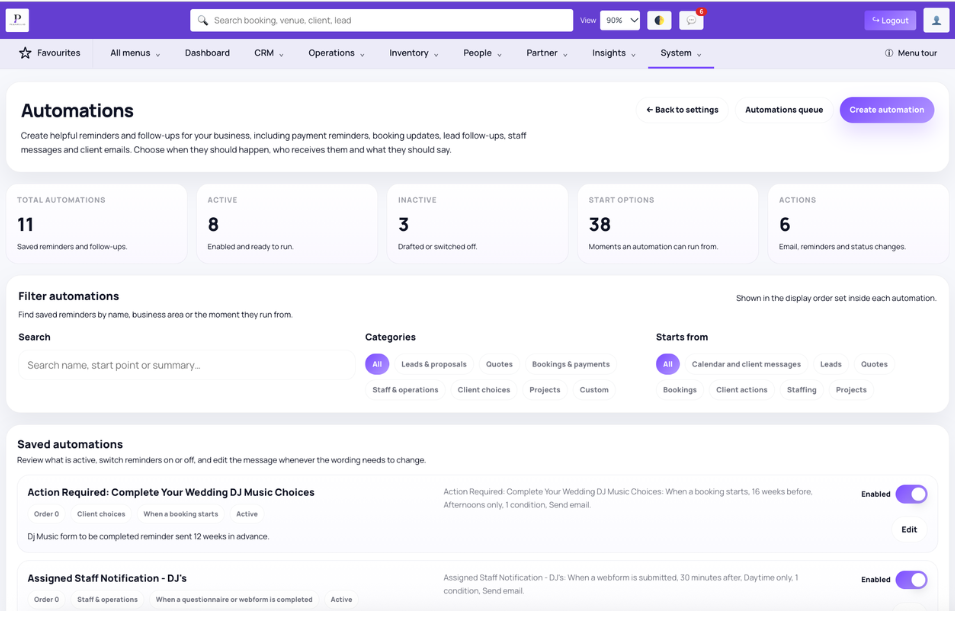
Current trigger families

Triggers cover meaningful events throughout the customer and delivery lifecycle.

  • Lead created, assigned, status changed or action due
  • Quote saved or emailed
  • Booking submitted, amended, confirmed, postponed, cancelled, started or ended
  • Payment, contract, webform, photo-template, staff and project events

Grouped conditions

Conditions keep a workflow from running simply because a trigger occurred.

  • Balance, payment, contract and event-date state
  • Lead, quote, booking and venue state
  • Package, extra, asset, service and staff requirements
  • Form completion, template choice, project stage and security-deposit state

Actions and examples

A quote follow-up can wait, check whether a booking now exists and send a branded message only when relevant.

  • Send a branded email
  • Attach a webform to a booking
  • Change booking or lead status
  • Create a follow-up reminder

Independent comparison

Don't just take our word for it

Use ChatGPT to independently compare Planellio with the event-business platforms you're considering. We've prepared a broad prompt that asks for a current, balanced review.

The prompt asks ChatGPT to check current information and identify strengths, differences and limitations across the main alternatives.

Ask ChatGPT to compare usOpens ChatGPT with the prepared comparison.

Next steps

Explore related Planellio pages

See how this workflow connects with the wider Planellio platform, from bookings and CRM to operations, payments, staffing and reporting.

Frequently asked questions

Frequently Asked Questions