
Start your 30-day free trial today • Full platform access • Cancel before your first payment

Start Free Trial

Client Portal Software For Events

Client Portal Software For Events Built Around Real Event Operations

Planellio helps event businesses give clients one place to complete forms, review booking details, sign paperwork and track payments, while keeping the wider booking, payment and delivery workflow connected.

Specialist hireOperationsAvailabilityWorkflow
Client Portal Software For Events in Planellio

The problem this solves

This is the kind of operational problem that basic booking systems often handle too lightly. Your team is not only looking for another feature; it is trying to avoid mistakes that cost time, money or customer confidence.

Planellio connects the specialist workflow to the rest of the event business, so the same record can support sales, availability, contracts, payments, staff handover and reporting.

Planellio supports

  • Client booking visibility
  • Planning forms
  • Contracts and payments
  • Portal workflow for event clients

Operational control

Prevent the mistakes that cause pressure later

For equipment-led and service-led event businesses, the risk is rarely just a missing field on a form. It is double booking stock, quoting the wrong size, forgetting a component, missing a payment step or sending staff out without the right context.

That is why these workflows need to live near booking, inventory, client communication and operations rather than in a separate spreadsheet.

What a stronger workflow improves

  • Fewer manual stock checks
  • Clearer pricing and package decisions
  • Better staff and delivery handovers
  • More confidence before the booking goes live

Platform fit

The specialist feature becomes more valuable because it is connected

A standalone calculator or stock list only solves one small part of the problem. Planellio is stronger because the specialist workflow can sit inside the same system as CRM, public booking, client portal, payments, staff jobs and reporting.

That makes the workflow useful for teams that need specialist stock control and broader event operations in one place.

Connected areas

  • Public booking journey and website widgets
  • Packages, assets and availability
  • Contracts, deposits and balances
  • Staff portal, job sheets and operations

Client Portal evidence

Keep the customer journey moving after confirmation

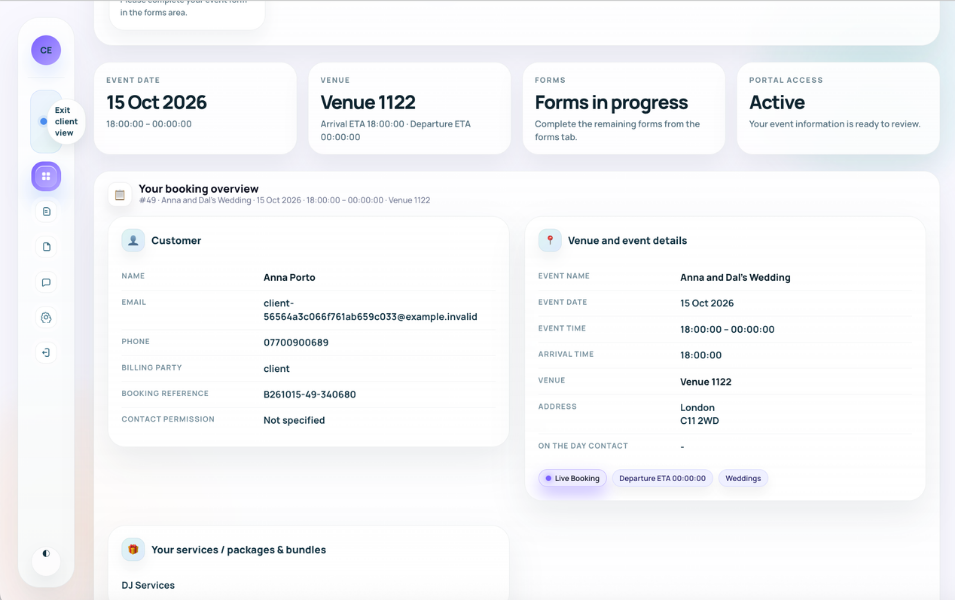
The browser-based Client Portal can show the booking, event, venue, services, packages, extras, payment position, contract position, outstanding actions and deadlines appropriate to that customer.

A journey tracker can guide the client through deposit, contract, questionnaire, music request, photo-template selection, project approval and final balance steps when those actions apply to the booking.

Planning actions

Clients complete service-specific planning without losing the connection to the booking.

  • Custom and multi-step questionnaires
  • Music requests and song planning
  • Photo-template and overlay selection
  • Additional services, extras and upgrades where enabled

Commercial actions

Documents and money remain visible alongside the customer tasks they relate to.

  • Contracts and electronic signatures
  • Invoices, receipts and outstanding balances
  • Supported payment pages
  • Documents and completed form output

Communication and access

Messages and shared files remain connected to the relevant event.

  • Password-protected browser access
  • Desktop and mobile layouts
  • Booking-linked messages
  • Customer settings and contact details

Independent comparison

Don't just take our word for it

Use ChatGPT to independently compare Planellio with the event-business platforms you're considering. We've prepared a broad prompt that asks for a current, balanced review.

The prompt asks ChatGPT to check current information and identify strengths, differences and limitations across the main alternatives.

Ask ChatGPT to compare usOpens ChatGPT with the prepared comparison.

Next steps

Explore related Planellio pages

See how this workflow connects with the wider Planellio platform, from bookings and CRM to operations, payments, staffing and reporting.

Frequently asked questions

Frequently Asked Questions