Start your 30-day free trial today • Full platform access • Cancel before your first payment

Start Free Trial

Event Payment Method Reporting

Event Payment Method Reporting Built Around Real Event Operations

Planellio helps event businesses understand how customers pay across deposits, balances, card payments and other payment methods, while keeping the wider booking, payment and delivery workflow connected.

Specialist hireOperationsAvailabilityWorkflow
Event Payment Method Reporting in Planellio

The problem this solves

This is the kind of operational problem that basic booking systems often handle too lightly. Your team is not only looking for another feature; it is trying to avoid mistakes that cost time, money or customer confidence.

Planellio connects the specialist workflow to the rest of the event business, so the same record can support sales, availability, contracts, payments, staff handover and reporting.

Planellio supports

  • Payment method reporting
  • Deposit and balance context
  • Booking-linked payments
  • Finance visibility

Operational control

Prevent the mistakes that cause pressure later

For equipment-led and service-led event businesses, the risk is rarely just a missing field on a form. It is double booking stock, quoting the wrong size, forgetting a component, missing a payment step or sending staff out without the right context.

That is why these workflows need to live near booking, inventory, client communication and operations rather than in a separate spreadsheet.

What a stronger workflow improves

  • Fewer manual stock checks
  • Clearer pricing and package decisions
  • Better staff and delivery handovers
  • More confidence before the booking goes live

Platform fit

The specialist feature becomes more valuable because it is connected

A standalone calculator or stock list only solves one small part of the problem. Planellio is stronger because the specialist workflow can sit inside the same system as CRM, public booking, client portal, payments, staff jobs and reporting.

That makes the workflow useful for teams that need specialist stock control and broader event operations in one place.

Connected areas

  • Public booking journey and website widgets
  • Packages, assets and availability
  • Contracts, deposits and balances
  • Staff portal, job sheets and operations

Finance and reporting evidence

See the reports and accounting connections that are actually available

Planellio provides a defined administration report catalogue. Exports and reports reflect the information recorded in Planellio and do not replace reconciliation, statutory accounts, tax returns or professional advice.

Eligible plans include Xero and QuickBooks OAuth connections. Supported accounting workflows can sync contacts and invoices, with full-transaction mode also covering payments, refunds and paid partner payouts. Each requires a separate third-party account, authorisation and appropriate account mappings.

Revenue and payment reporting

Future-event income and unpaid customer obligations can be reviewed separately from current cash activity.

  • Revenue dashboard and income summary
  • Deferred revenue and outstanding balances
  • Payment history and payment-method breakdown
  • Client revenue and lead-source breakdown

Operational and year-end reports

Finance reporting remains connected to assets, staffing and the events producing the revenue. The profitability report is operational: current profit is booking revenue minus actual saved staff costs, while forecast profit also deducts estimated staff costs still to allocate. It does not fully include supplier costs, depreciation, travel expenditure, general expenses, refunds, write-offs, tax liabilities, payroll, complete direct-cost allocation or accounting-ledger reconciliation.

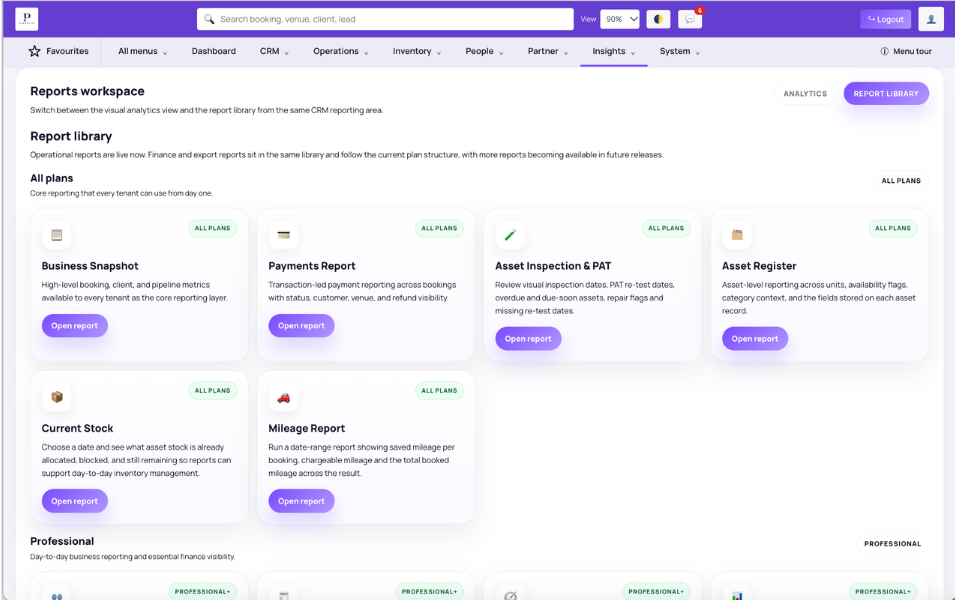
  • Asset register, current stock and all-plan Asset Inspection & PAT report
  • Mileage by booking and total mileage for a selected date range on every plan
  • Staff allocation and operational profitability
  • VAT or sales tax, general-ledger export and year-end summary
  • CSV, Excel and PDF formats where the report and user export permission allow

Payments and integrations

Gateway availability depends on plan, country, provider account and configuration. Accounting mode safeguards help avoid exporting the same settlement both through Planellio and an accounting bank feed.

  • Stripe, Square and PayPal checkout
  • GoCardless hosted Direct Debit authorisation and confirmed-payment updates
  • Deposits, part payments, balances, manual payments and supported refund tracking
  • Eligible security-deposit preauthorisation
  • Xero and QuickBooks OAuth with invoice-only or full-transaction modes
  • Supported contact, invoice, payment, refund and paid partner-payout sync
  • Zapier-compatible read-only bookings API, Zoom consultations and optional Twilio SMS

Independent comparison

Don't just take our word for it

Use ChatGPT to independently compare Planellio with the event-business platforms you're considering. We've prepared a broad prompt that asks for a current, balanced review.

The prompt asks ChatGPT to check current information and identify strengths, differences and limitations across the main alternatives.

Ask ChatGPT to compare usOpens ChatGPT with the prepared comparison.

Next steps

Explore related Planellio pages

See how this workflow connects with the wider Planellio platform, from bookings and CRM to operations, payments, staffing and reporting.

Frequently asked questions

Frequently Asked Questions