Start your 30-day free trial today • Full platform access • Cancel before your first payment

Start Free Trial

Native Planellio artwork workflow

A Native Photo Booth WYSIWYG Editor Inside The Client Journey

Planellio does more than record a template choice. Operators configure editable artwork and clients visually personalise the permitted content in the Client Portal before the completed design is downloaded for production.

Native visual editorClient personalisationMultiple layoutsDownloadable artwork
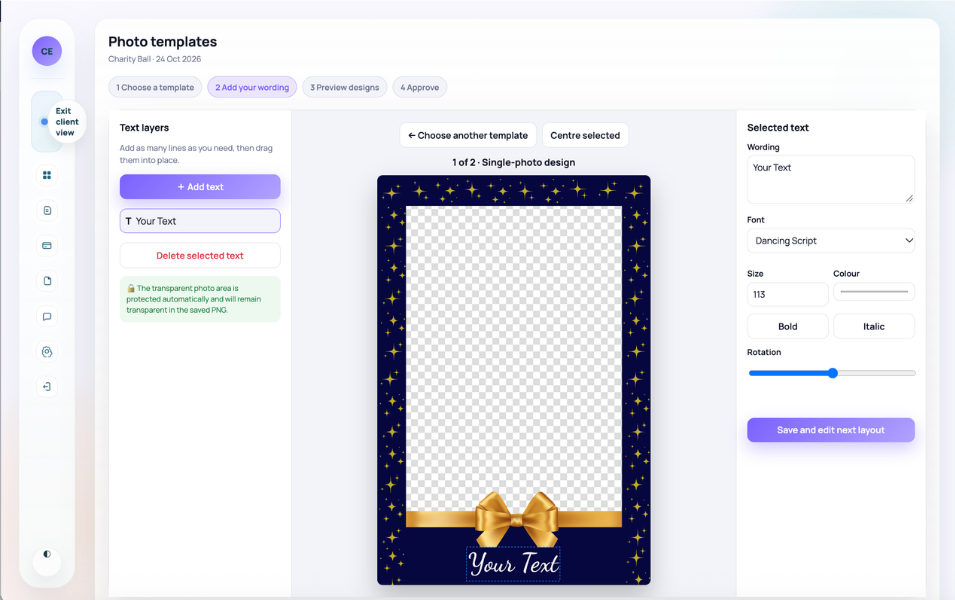
Planellio native photo booth WYSIWYG editor showing draggable text layers, fonts, sizing, colours, styling and rotation controls

This is editing, not only selection or approval

Planellio supports three distinct photo-template routes and they should not be confused. A business can upload finished overlays for simple client selection and wording collection; it can use the separate TemplatesBooth catalogue provider for browsing and selection; or it can enable Planellio's native WYSIWYG workflow so a client edits configured artwork visually inside the Client Portal.

The native editor is designed for controlled personalisation rather than an unrestricted blank-canvas graphics package. The operator prepares the layouts and editable text layers; the client changes the permitted content and presentation within that configured design. This keeps brand and production control with the operator while giving the client a genuine live visual editing experience.

Native editor capabilities

  • Multiple configured artwork layouts
  • Editable text layers selected by the operator
  • Visual drag positioning
  • Font-family selection from the configured choices
  • Font-size controls
  • Text colour controls
  • Text rotation
  • Bold and italic styling
  • Text alignment controls
  • Live client personalisation in the Client Portal
  • Completed artwork retained with the booking workflow
  • Downloadable finished artwork for photo-booth production software

Operator configuration

The photo-booth operator controls what can be edited

The business prepares the template and its supported layouts, defines the text layers and controls which content the customer is allowed to personalise. This creates a repeatable editable product without asking every client to work from a blank design.

Configured controls can cover the text itself, its position, font, size, colour, rotation, bold or italic treatment and alignment. The editable layer remains part of the prepared layout rather than becoming an unrelated note sent to the operator.

Configuration evidence

  • Prepared template and layouts
  • Operator-selected editable areas
  • Configured text-layer controls
  • Reusable client-facing design
  • Controlled rather than unrestricted editing

Client experience

Clients personalise the artwork visually in the Client Portal

When the editable workflow is enabled for the booking, the client opens the artwork through their Planellio Client Portal. They see the design and adjust the permitted text and presentation visually rather than returning wording through a plain questionnaire or email.

The client can review the completed result in context before submitting it. The finished personalised artwork remains connected to the booking, alongside the wider questionnaire, backdrop, print, sharing and event-planning information.

Client workflow

  • Open from the Client Portal
  • View the configured design
  • Edit permitted text layers visually
  • Position and style within allowed controls
  • Review the completed result
  • Submit it against the booking

Production handover

The operator downloads completed artwork for production

After personalisation, the operator can access and download the completed artwork for use in the relevant photo-booth production software. The purpose is to carry the client's approved design into delivery without recreating their choices from email notes.

The artwork workflow remains connected to booth equipment, attendants, backdrops, questionnaires, print and sharing requirements, job information and event delivery inside the wider booking.

Handover evidence

  • Completed personalised output
  • Operator download
  • Booking-linked design record
  • Connected booth and backdrop choices
  • Connected print and sharing requirements
  • Clearer production handover

Important distinction

Native editing and TemplatesBooth selection are separate workflows

TemplatesBooth can provide a catalogue for browsing and selecting a design where enabled. That provider workflow does not become the Planellio native editor, and catalogue artwork is not presented as being edited through the native WYSIWYG workflow.

Likewise, selecting a finished overlay and providing wording is not the same as visual editing. The native workflow is the route that supplies multiple layouts and positioned, styled text-layer personalisation inside Planellio.

Do not conflate

  • Finished-overlay selection
  • Wording collection
  • TemplatesBooth catalogue selection
  • Planellio native WYSIWYG editing

Photo booth platform evidence

More than a photo booth booking diary

Planellio connects photo booth enquiries, CRM, availability, packages, proposals, contracts, payments, client planning, booth assets, attendants and job information. The same booking can also include other event services without reducing those services to disconnected invoice lines.

For example, one event can contain a photo booth, DJ, LED starlit dancefloor, light-up letters and audio guestbook. Each service can retain its own assets, quantities, extras, package configuration, staffing and operational information while the client sees one connected event journey.

Native WYSIWYG editor and template choice

Administrators can maintain finished or editable photo templates. Clients can browse and select a finished design with overlay wording, or personalise an operator-enabled native template visually in the Client Portal. The WYSIWYG editor supports multiple configured layouts and text layers with drag positioning, font choice, font size, colour, rotation, bold, italic and alignment; the operator can download the completed artwork for production. TemplatesBooth is a separate catalogue-selection provider, not the native editor.

  • Finished-template library and client-visible choices
  • Native visual WYSIWYG personalisation
  • Multiple layouts and configurable text layers
  • Position, font, size, colour, rotation and alignment controls
  • Downloadable completed artwork
  • Separate TemplatesBooth catalogue selection
  • Admin review, reminders and automation conditions

Photo booth sales and planning

The photo booth workflow starts before the booking and continues after payment, keeping customer choices and delivery details connected.

  • Enquiries, leads and source reporting
  • Packages, variants, extras and availability
  • Multiple quotes and branded proposals
  • Contracts, deposits, invoices and receipts

Delivery and mixed services

A booth can reserve physical equipment and require a booth attendant while another service on the same event reserves different stock and roles.

  • Booth assets and package requirements
  • Questionnaires and outstanding client actions
  • Booth-attendant requirements and assignment
  • Job sheets, venue detail and multi-service handover

Feature overview

What the native Planellio editor actually supports

This evidence should be assessed separately from template libraries, provider integrations and approval-only workflows.

CapabilityPlanellio workflow
Where editing happensInside the Planellio Client Portal for an operator-enabled editable template
Editing modelControlled WYSIWYG personalisation of configured layouts and text layers
PositioningVisual drag positioning for permitted text layers
TypographyConfigured font choice, font size, bold, italic and alignment
AppearanceText colour and rotation controls
LayoutsSupport for multiple configured layouts
CompletionClient reviews/submits the personalised design against the booking
ProductionOperator downloads completed artwork for use in photo-booth software
TemplatesBoothA separate catalogue browsing/selection route, not the native editor
Finished overlaysCan be offered for selection and wording without enabling visual editing

Independent comparison

Don't just take our word for it

Use ChatGPT to independently compare Planellio with the event-business platforms you're considering. We've prepared a broad prompt that asks for a current, balanced review.

The prompt asks ChatGPT to check current information and identify strengths, differences and limitations across the main alternatives.

Ask ChatGPT to compare usOpens ChatGPT with the prepared comparison.

Next steps

Explore related Planellio pages

See how this workflow connects with the wider Planellio platform, from bookings and CRM to operations, payments, staffing and reporting.

Frequently asked questions

Frequently Asked Questions